Why do bathroom remodels need a visual more than other rooms?
A bathroom is small, but it's full of decisions: tub or shower, tile and tile height, glass, niche, vanity, fixtures and finishes. Homeowners struggle to picture how those choices come together in their own room, so they hesitate, ask for more time, or compare bids on price alone.
Bathrooms are also hard to change once tile is set. A client who has seen the finished bathroom before work starts is less likely to say "that's not what I imagined" halfway through.
At our own remodeling company, our close rate went from 3 in 10 estimates to 5–6 in 10 after we started sending 360° tours.
Which bathroom remodel apps are best?
| App | Best for | Uses the real bathroom? | Really free? | Price |
|---|---|---|---|---|
| Remodel in 360 | Contractors closing bathroom jobs | Yes, 360° from 2 photos | First full tour free | Then $49/month (4 tours) |
| Chief Architect | Detailed bath design and drawings | No, you draw it | No (trial) | $229/month or $1,995/year |
| Houzz Pro | All-in-one business software | No, 3D floor plan | Free plan with limits | $99–$399+/month |
| RoomSketcher | Bathroom floor plans | No, you draw it | Free plan, 2 credits | Pro $12/month billed yearly |
| Planner 5D | Quick DIY layouts | No, you draw it | Free version | Paid plans |
| Homestyler | Free 3D bathroom planner | No, you draw it | Yes, free version | Pro $4.90/month |
| RoomGPT | Quick idea from one photo | One photo, restyled | 1 free redesign | Credit packs from $9 |
| Remodel AI | Homeowner inspiration | One photo, restyled | Free start | From $6.99/week |
Prices from each company's website or Capterra, checked October 2026. They change, so confirm before you buy. All names are trademarks of their owners. We make Remodel in 360, so weigh our view of our own product accordingly.
1. Remodel in 360: best for closing the estimate
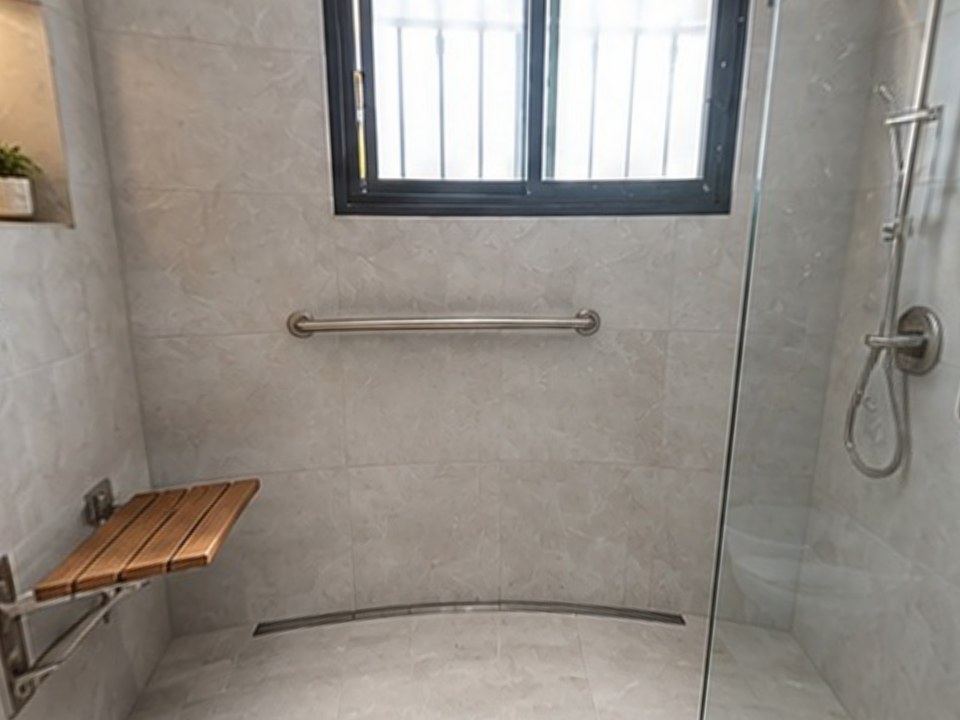
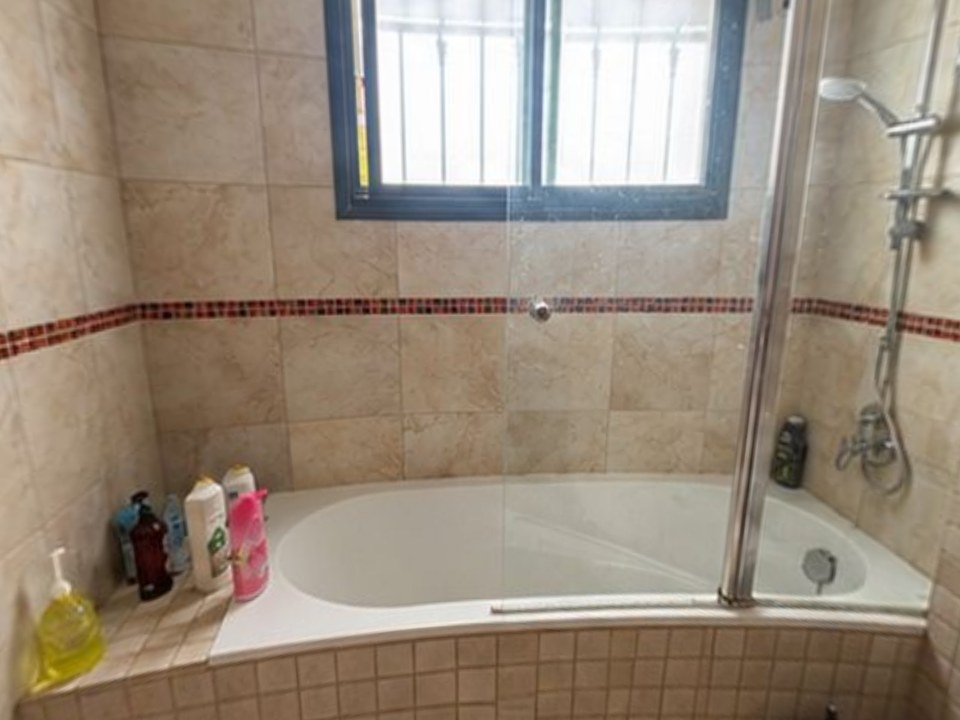
Take 2 photos of the bathroom at the estimate, type or dictate the plan ("tub out, curbless shower, glass panel, tile to the ceiling, keep the vanity and mirror"), and about 6 minutes later send a 360° tour of that bathroom before and after, every change labeled. The client opens one link on any phone.
- Keeps what stays and checks every change against your list; missed changes are redrawn free
- 2 change rounds per tour, so "lighter floor tile?" gets a new version in about 2 minutes
- Plans: Starter $49/month (4 tours), Pro $99 (12), Team $249 (35). See pricing
The tradeoff: it doesn't measure, price or draw plans.
2. Chief Architect: best for detailed bath design
Professional design software used by kitchen and bath designers: plans, elevations, cabinets and 3D renders. Premier is $229/month or $1,995/year.
The tradeoff: hours per bathroom and a learning curve. See Chief Architect alternative.
3. Houzz Pro: best all-in-one business tool
Leads, CRM, estimates, proposals, 3D floor plans and project management. Free plan; Design $99/month, Pro $199/month, Teams from $399/month.
The tradeoff: the 3D part is one feature in a big suite. See Houzz Pro alternative.
4. RoomSketcher: best for bathroom floor plans
Draw a bathroom floor plan and get 2D, 3D and 360° views of the design. Free plan with 2 credits; Pro $12/month billed yearly.
The tradeoff: it's a model, not the client's bathroom. See RoomSketcher alternatives.
5. Planner 5D: best for quick layouts
Draw or upload a floor plan, place a tub, shower and vanity, and view it in 3D. Free version, with watermarks on free exports, and paid plans.
The tradeoff: generic catalog, and you draw the room. See Planner 5D alternatives.
6. Homestyler: best free 3D bathroom planner
Browser-based 2D/3D planner with a large product library and good renders. Free; Pro $4.90/month, Master $9.90/month (Capterra, October 2026).
The tradeoff: a 3D model, not an AI view of the real room. See Homestyler alternatives.
7. RoomGPT: best for a quick free idea
Upload one photo and get AI redesigns in different themes. 1 free redesign, then credit packs from $9.
The tradeoff: one angle, and it may move or change fixtures that should stay. See RoomGPT alternatives.
8. Remodel AI: best for homeowner inspiration
Redesigns a photo of a bathroom in seconds, mainly for homeowners. Free to start; plans from $6.99 a week.
The tradeoff: built for ideas, not for a contractor's quote. See Remodel AI alternatives.
Which bathroom remodel app is actually free?
Most "free" apps limit you: a few credits, watermarks, or low-resolution exports. Homestyler has a usable free 3D planner, RoomGPT gives 1 free redesign, Houzz Pro and RoomSketcher have limited free plans, and Remodel in 360 gives one full tour free with no card, on a real job.
Should you use an AI app or a 3D planner for bathrooms?
| You need to… | Use | Why |
|---|---|---|
| Get the client to say yes | AI tour of the real bathroom (Remodel in 360) | They see their own room finished, in minutes |
| Check the vanity or shower fits | 3D planner or CAD | Exact sizes and clearances |
| Get permit or shop drawings | Chief Architect or CAD | Construction-grade output |
| Show a homeowner quick ideas | One-photo AI app | Fast and cheap |
Many contractors use both: the AI tour to win the job, the planner to build it. See bathroom remodel software and the bathroom remodel visualizer.
What do AI bathroom apps get wrong?
- Moving the toilet or drain in a picture, which can mean opening the floor in real life
- Tile and vanity sizes that look bigger or smaller than they will be
- Changing fixtures, windows or doors the client wants to keep
- Ignoring clearances, door swing and ventilation
Remodel in 360 keeps what you list as staying and labels every tour as a visualization, not a construction drawing. More in AI bathroom remodel.
How much does a bathroom remodel cost in 2026?
About $100 to $500 per square foot, or $3,500 to $25,000+ for an average 35 to 50 square foot bathroom, and up to $60,000 for a large primary bath with high-end finishes, according to HomeGuide (checked October 2026). For tub-to-shower jobs, see tub to shower conversion software.